

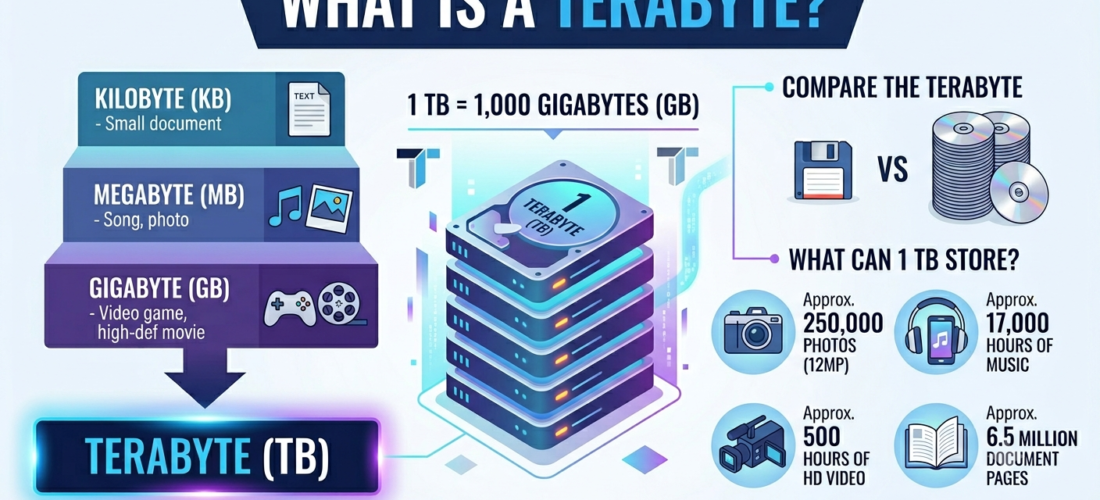
Most people come across the word terabyte when they buy a laptop, pick a cloud storage plan, or check their monthly internet data allowance. The term appears constantly in product listings and tech specs, yet it rarely gets explained in a way that helps you make better decisions. This article covers everything worth knowing: the definition, the full data scale, what a terabyte can actually hold, hardware options, pricing, and the most common mistakes buyers make.
What Is a Terabyte?
A terabyte (TB) is a unit of digital storage equal to 1,000 gigabytes in decimal notation, or 1,099,511,627,776 bytes in binary notation. It is the standard measure for hard drive capacity, cloud storage plans, and large-scale data systems.
The prefix “tera” originates from the Greek word for monster. It was chosen to reflect how enormous the unit seemed when it was first standardised. Today, terabytes are not remarkable at all. Consumer laptops, gaming consoles, and smartphones now ship with 1TB of internal storage as a common configuration.
The Digital Storage Hierarchy: From Bits to Zettabytes
Understanding a terabyte is easier when you see it alongside the full data scale. Each unit in the storage hierarchy is roughly 1,000 times larger than the one before it.
| Unit | Abbreviation | Approximate Size | Real-World Equivalent |
|---|---|---|---|
| Byte | B | 8 bits | One text character |
| Kilobyte | KB | 1,000 bytes | One short email |
| Megabyte | MB | 1,000 KB | One MP3 song (about 4MB) |
| Gigabyte | GB | 1,000 MB | One HD film (about 2GB) |
| Terabyte | TB | 1,000 GB | 500 hours of HD video |
| Petabyte | PB | 1,000 TB | Entire printed US Library of Congress |
| Exabyte | EB | 1,000 PB | All internet traffic in a single day |
| Zettabyte | ZB | 1,000 EB | Total global data generated per year |
A terabyte sits in the middle of this scale. It is large enough for most personal users and considerably smaller than what modern cloud providers and data centres manage every day.
Binary vs. Decimal: Why Your 1TB Drive Shows Only 931GB
This is one of the most common points of confusion for storage buyers, and it catches a lot of people off guard. You purchase a 1TB hard drive, connect it to your computer, and the operating system reports roughly 931GB of available space. That is not missing storage. It is the result of two competing measurement standards.
Storage manufacturers calculate capacity using the decimal system, where 1TB equals exactly 1,000 gigabytes. Operating systems like Windows calculate storage using the binary system, where 1TB equals 1,024 gigabytes. The gap between these two standards grows larger as drive capacity increases.
The technical term for the binary version is a tebibyte (TiB). One tebibyte equals 1,024 gibibytes, which is slightly more than a decimal terabyte. Because manufacturers and operating systems use different standards, the number displayed on your screen will almost always fall short of the number printed on the box.
The practical solution: Expect around 7 to 9 per cent less usable space than the labelled capacity. A 1TB drive shows roughly 931GB. A 2TB drive shows roughly 1.86TB. Always account for this gap when deciding how much storage you actually need.
How Much Data Can 1TB Actually Hold?
The answer depends on the file type and the quality settings used. The same 1TB drive holds very different amounts depending on whether you store raw camera files or compressed office documents.
| User Type | Approximate Capacity of 1TB |
|---|---|
| Photographer | Around 250,000 DSLR photos at 4MB each |
| Videographer | Around 150 hours of 4K footage |
| HD Streaming | Around 500 hours of 1080p video |
| Music Listener | Around 200,000 MP3 songs |
| Gamer | Around 5 to 10 modern AAA titles |
| Office Worker | Around 85 million Word documents |
For a broader sense of scale: the entire printed collection of the US Library of Congress takes up roughly 10 terabytes. A single terabyte could hold around 1,000 copies of the Encyclopaedia Britannica. The Hubble Space Telescope generates approximately 10 terabytes of new scientific data every year.
These comparisons show that terabyte-scale storage is now essential in everyday computing and in large-scale scientific and commercial environments alike.
HDD vs. SSD: Choosing the Right 1TB Storage
Knowing how much space you need is only part of the decision. You also need to choose between a hard disk drive (HDD) and a solid-state drive (SSD). Both offer 1TB of capacity, but they differ significantly in speed, durability, and price.
| Factor | 1TB HDD | 1TB SSD |
|---|---|---|
| Average Price | £25 to £45 | £65 to £95 |
| Read/Write Speed | 80 to 160MB/s | 500 to 7,000MB/s |
| Durability | Has moving parts, more fragile | No moving parts, more resilient |
| Best Use Case | Backup, archiving, media storage | Operating system, games, active files |
| Average Lifespan | 3 to 5 years | 5 to 10 years |
| Power Consumption | Higher | Lower |
HDDs remain the better choice for large-capacity backup storage on a tight budget. SSDs are faster and more reliable, which makes them the right choice for primary drives in laptops and desktops. Many users now run both: an SSD for the operating system and active files, and a larger HDD for backup and media collections.
Modern HDDs use helium-filled internal designs that allow manufacturers to fit more storage platters into the same physical space. Consumer-grade drives now reach up to 20TB in a single unit. Enterprise SSDs have crossed the 100TB mark. Both technologies continue to push the cost per gigabyte lower each year.
How Much Does 1TB of Storage Cost?
Storage costs have fallen dramatically over the past two decades. When the first 1TB consumer hard drive launched in 2007, it cost around $375. Today, a 1TB external hard drive is available for under $50, and a reliable 1TB SSD typically costs under $100.
Cloud storage pricing has followed the same downward trend. Most providers now offer 1TB of personal cloud storage for between $5 and $10 per month. Enterprise cloud pricing scales by the terabyte and varies based on usage volume, redundancy level, and the type of access required. Businesses managing several active terabytes can expect to pay between $20 and $100 per terabyte monthly, depending on the provider and service tier.
The cost per gigabyte continues to fall across both physical drives and cloud subscriptions. Buying terabyte-scale storage today offers far better value than at any previous point in computing history.
Is 1TB Enough Storage for You?
Whether 1TB meets your needs depends on what you store and how you use your device.
For general users who browse the web, stream content, and keep personal documents and photos, 1TB is more than enough. Most people in this category use fewer than 200GB in total on their device.
Photographers and videographers will find that 1TB fills up faster than expected. A single 4K video session can consume between 50 and 100GB depending on the camera and format. Creative professionals typically work with 2TB or more on their primary drive and use external or cloud storage for long-term archiving.
Gamers face a similar challenge. Modern AAA titles frequently exceed 100GB each, with some titles pushing closer to 150GB or 200GB after updates and downloadable content. A 1TB SSD holds around five to eight current-generation games comfortably, but serious players with large active libraries will need more.
Average household internet consumption has also crossed the 1TB mark in many regions. Streaming 4K content, video conferencing, and connected smart home devices all contribute to monthly data use. Some internet service providers cap their plans at 1TB per month, which means heavy users may need to monitor consumption or upgrade to an unlimited plan.
Terabytes in AI, Big Data, and Enterprise Systems
Terabytes are no longer a concern limited to personal computing. In enterprise environments and artificial intelligence, a terabyte is the starting point for most serious data work.
Training a large language model or an image recognition system requires terabytes of labelled data before the model becomes useful. Organisations processing financial records, healthcare data, or retail transactions generate dozens to hundreds of terabytes per day at scale. A single data centre may manage thousands of terabytes distributed across petabyte-level storage arrays.
Understanding terabyte capacity helps data teams plan storage infrastructure, estimate operating costs accurately, and design systems that scale without hitting unexpected bottlenecks.
What Comes After a Terabyte?
The next unit up from a terabyte is the petabyte, which equals 1,000 terabytes. After that comes the exabyte at 1,000 petabytes, and then the zettabyte at 1,000 exabytes. These are not theoretical units. Global internet traffic now operates at the zettabyte level annually, and the largest technology and government organisations manage petabyte-scale and exabyte-scale systems as part of their daily operations.
Understanding the full data scale helps users and organisations plan for future growth, particularly as the volume of digital data created each year continues to expand at a rapid pace.
Common Mistakes When Buying Terabyte Storage
Mistake 1: Ignoring the binary gap. Buyers frequently choose exactly the capacity they think they need, then feel short-changed when their device shows less. Always buy slightly above your estimated requirement to account for the 7 to 9 per cent reduction in displayed capacity.
Mistake 2: Using an HDD as a primary drive for speed-sensitive tasks. Hard disk drives are perfectly capable of backup and archiving, but using one as your main operating system drive will noticeably slow your computer. Use an SSD for your OS and frequently accessed applications.
Mistake 3: Underestimating the space that 4K content requires. Many users assume 1TB will last for years, then discover that a single month of 4K shoots fills the drive. If you work with 4K footage regularly, plan for at least 2TB and a dedicated backup solution from the start.
Mistake 4: Treating cloud storage as a backup. Cloud storage is not the same as a backup. A ransomware attack, lost account access, or a provider pricing change can cut off your access to files stored online. A reliable strategy keeps at least one local copy and one cloud copy of all important data.
Frequently Asked Questions
What is a terabyte in simple terms?
A terabyte is a unit of digital storage that equals 1,000 gigabytes. It measures how much data a device or cloud service can hold.
How many gigabytes are in a terabyte?
One terabyte contains 1,000 gigabytes in the decimal system used by most manufacturers and cloud providers. In the binary system, one terabyte equals 1,024 gigabytes.
Is 1TB a lot of storage?
For most personal users, yes. One terabyte holds around 250,000 photos, 500 hours of HD video, or five to eight modern video games. Creative professionals and serious gamers often need 2TB or more.
Why does my 1TB drive show only 931GB?
Manufacturers label drives using the decimal system where 1TB equals 1,000GB. Your operating system measures using the binary system where 1TB equals 1,024GB. This difference accounts for the gap between the labelled capacity and the available space on screen.
What is bigger than a terabyte?
A petabyte is the next unit up, equal to 1,000 terabytes. After that comes the exabyte (1,000 petabytes) and the zettabyte (1,000 exabytes).
How long does it take to download 1TB?
At 100Mbps, downloading 1TB takes roughly 22 to 24 hours. At 1Gbps, the same download completes in approximately 2 to 3 hours.
What is the difference between a terabyte and a tebibyte?
A terabyte (TB) equals 1,000GB in the decimal system. A tebibyte (TiB) equals 1,024GB in the binary system. Most consumer products use TB, while operating systems often use tebibytes internally without making the distinction obvious to users.
How much does 1TB of cloud storage cost?
Most personal cloud storage plans charge between $5 and $10 per month for 1TB. Enterprise pricing varies based on usage volume, redundancy requirements, and the chosen provider.
Conclusion
A terabyte equals 1,000 gigabytes and represents the current standard for consumer hard drives, cloud storage subscriptions, and enterprise data infrastructure. The binary versus decimal discrepancy explains why a labelled 1TB drive always displays less space than expected on your screen. For most personal users, 1TB provides excellent value and sufficient capacity for photos, music, documents, and games. Creative professionals, gamers with large libraries, and organisations handling data at scale will typically need to move beyond a single terabyte. As AI workloads, 4K content, and connected devices continue to grow, understanding terabyte-scale storage is a practical skill that becomes more relevant every year.

